Realistic Clouds for Flash 8 [Flash][Backgrounds]

Started by: Wtf | Replies: 11 | Views: 6,204

Wtf
2

Posts: 5,683
Joined: Oct 2006
Rep: 10

View Profile
Mar 2, 2007 7:01 PM #25060
Hi, I'm here to explain you how to make realistic clouds for Flash 8.

Let's start with this:
Image
http://i145.photobucket.com/albums/r230/flashingflash/cloud1.jpg
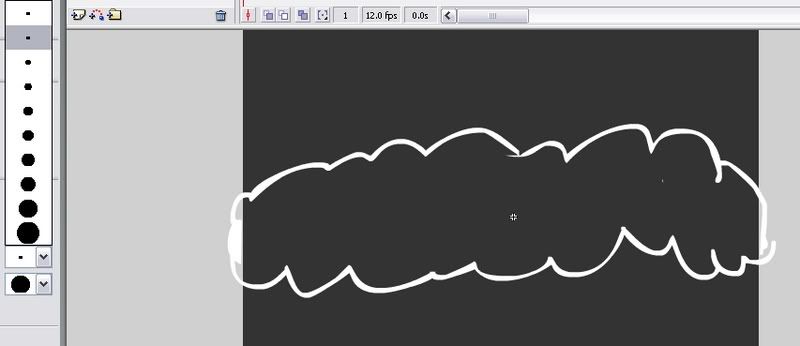
Draw a simple brushed cloud, I sugest the 2nd brush.
Image
http://i145.photobucket.com/albums/r230/flashingflash/cloud12.jpg
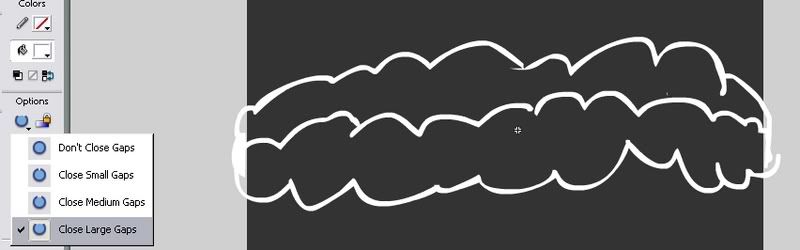
Next, make a filling with the brush, like that, and colour it inside:
Image
http://i145.photobucket.com/albums/r230/flashingflash/cloud123.jpg
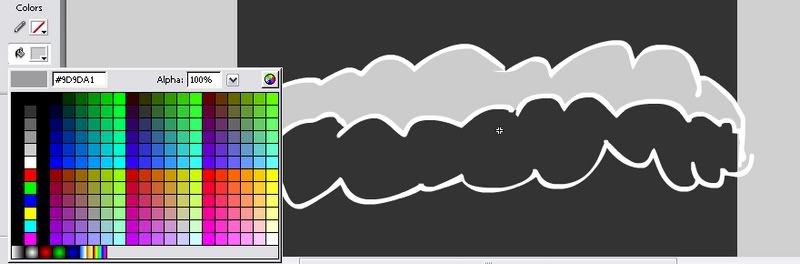
Okay, fill the left part *not the grey part* with [SIZE="4"]white[/SIZE]

Image
http://i145.photobucket.com/albums/r230/flashingflash/cloud1234.jpg
It should look like this.
___

Let's start with the Filters part
Image
http://i145.photobucket.com/albums/r230/flashingflash/cloud12345.jpg
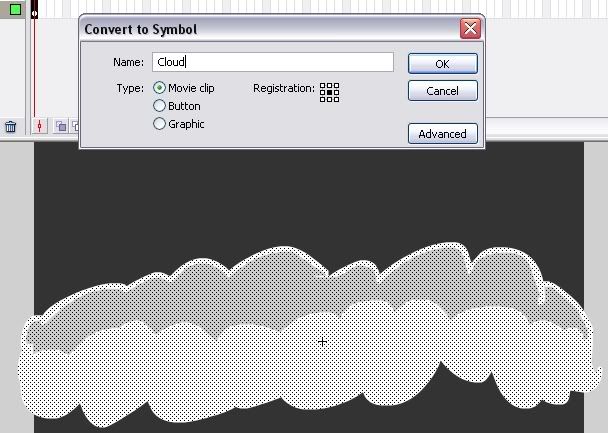
Select all the image, and press F8. Here, see it.
You just transformed the image in a Movie Clip (MC).
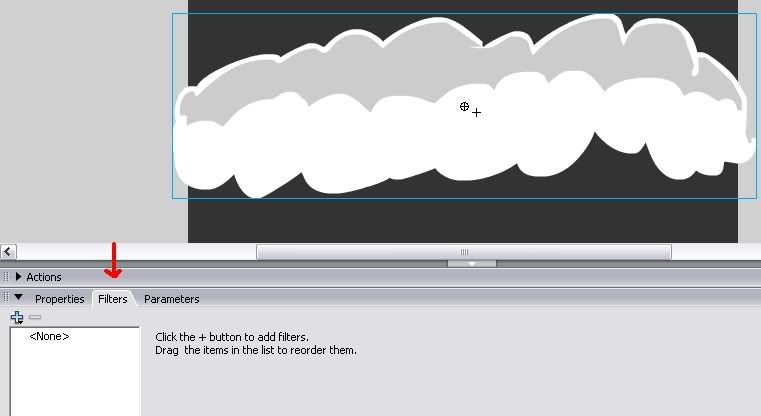
Image
http://i145.photobucket.com/albums/r230/flashingflash/cloud123456.jpg
Now go down to the Filters menu.
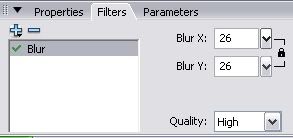
Image
http://i145.photobucket.com/albums/r230/flashingflash/cloud1234567.jpg
Put this in, after you selected Blur, from the effects.
____

In the end, you can do what you feel like with them!
I made this:

Image

Good Luck!
-Wtf
Deathwish
2

Posts: 3,793
Joined: May 2006
Rep: 10

View Profile
Mar 2, 2007 7:25 PM #25062
Very nice tut Wtf.
Nicely explained and an all round good effect*thumbs up*
Wtf
2

Posts: 5,683
Joined: Oct 2006
Rep: 10

View Profile
Mar 2, 2007 9:31 PM #25071
^_^
My first tut had to be good!
Or else I woudn't have the courage to post another..
Lolz
NobodY

Posts: 0
Joined: Jan 2026
Mar 3, 2007 4:25 AM #25114
It's fair, but not "realistic" I'd say. More like blurred clouds ^_^.
I'd say add more details or something, clouds are still too flat, you need more depth not blurred.
Glass
2

Posts: 53
Joined: Aug 2006
Rep: 10

View Profile
Mar 3, 2007 1:57 PM #25152
some of the lines needed to be finer, and clouds arent usually just a long bumpy thing, usually more like this:
Image
but still, for a first tut it was pretty good, and anyway, it taught me how to use blur. =)
xfireanimator

Posts: 0
Joined: Jan 2026
Mar 4, 2007 7:55 PM #25313
Thanks dude :) so cool .......it works perfectly , i made a flash with moving clouds
squarion
2

Posts: 2
Joined: Jan 2007
Rep: 10

View Profile
Mar 8, 2007 9:26 PM #25750
nice, the cheap way :D
mintedmomo

Posts: 0
Joined: Jan 2026
Mar 12, 2007 4:08 PM #26254
it was well explained but a bit unrealistic
jsac

Posts: 0
Joined: Jan 2026
Mar 27, 2007 2:24 AM #27817
woohoo now i know how to make clouds! :D
Exile
Administrator
2

Posts: 8,404
Joined: Dec 2005
Rep: 10

View Profile
Mar 28, 2007 2:44 AM #27901
Quote from glass
some of the lines needed to be finer, and clouds arent usually just a long bumpy thing, usually more like this:
Image
but still, for a first tut it was pretty good, and anyway, it taught me how to use blur. =)


No cloud has a black outline, and clouds can be any shape, really. His just needed variation.

I just draw random light grey/dark grey brush strokes and blur the hell out of them, that always works.
cjip

Posts: 0
Joined: Jan 2026
Mar 28, 2007 1:50 PM #27942
Hey! Very useful tut.... Now I can fill my ugly skies!
tfunk92

Posts: 0
Joined: Jan 2026
Apr 2, 2007 6:00 PM #28569
i cant follow this that well